You opened your phone “for a second” three hours ago. You don’t remember why.
You’re not weak. You’re not undisciplined. You’re outnumbered. There are roughly 1,500 engineers in Menlo Park whose entire job is to make you do exactly what you just did — and they’re better at their job than you are at resisting it.
This guide isn’t about willpower. Willpower already lost. This is about how to reduce screen time using the only methods that actually hold up against a billion-dollar attention economy.
The Numbers Nobody Wants You to See
The average American adult spends 5 hours and 16 minutes per day on their phone — up 14% from the previous year, according to a 2024 Harmony Healthcare IT survey. That’s just the device in your pocket. Not TVs, not laptops.
Do the math: 5h 16m × 365 days = 1,922 hours per year. That’s 80 full days awake, staring at a screen.
The 2024 Reviews.org study tracked something even more alarming: Americans now check their phones 205 times per day — once every five minutes during waking hours. Up 42% from 2023. And 80.6% of people check their phone within 10 minutes of waking up.
Most of those checks weren’t planned. You sat down to read. You picked up your phone “to check one thing.” 47 minutes later you closed Instagram with no memory of opening it.
That’s not a personal failure. That’s the product working as designed.
Why Every Screen Time App Has Failed You
Open any “10 ways to reduce screen time” article and you’ll find the same recycled advice: turn off notifications, use grayscale mode, set app timers, put your phone in another room.
These tips don’t work. There’s a specific reason why: every single one of them lives on the device you’re trying to escape. The off-switch is right next to the on-switch.

The off-switch is right next to the on-switch.
Apple’s Screen Time limit pops up. You see “Ignore Limit.” You tap it. The whole “intervention” took 0.4 seconds.
Software living on your phone cannot fight your phone. In the moment you actually want to bypass it, your motivation to bypass is at maximum and your motivation to follow through is at minimum. The American Psychological Association’s guidance on social media and mental health emphasizes environmental and structural changes over individual willpower as the mechanism for sustained behavior change.
The only screen time interventions with strong long-term adherence are the ones that physically separate you from the device.
What Actually Works (Ranked by Research)
Every common method, ranked by what actually holds up at six months.

Physical separation. No bypass. No negotiation.
1. Physical separation — the only method with high long-term adherence. Phone in a drawer. Phone in another room. Phone tapped to a physical NFC blocker like Shift that disables the apps until you walk back to the device. The friction is real, not symbolic. By the time you’ve moved, the urge has usually passed.
2. Habit replacement — works if the replacement is at hand. A book on the bedside table. A guitar in the corner. A puzzle on the dining table. The replacement must be at least as easy to start as opening Instagram. If it requires “going somewhere,” you’ll lose to the algorithm every time.
3. Boundary timing — works only when externally enforced. No phone before 9am, no phone after 9pm. Self-enforced boundaries fail because the negotiation happens at the worst possible moment — when you want to break them. If you must use boundaries, lock them with a physical device so the negotiation isn’t possible.
4. App deletion — works if you delete the account, not just the app. Reinstating an account requires email verification and watching your follower count rebuild from scratch. That friction is the actual mechanism.
5. App timers — lowest adherence in the research. The “Ignore Limit” button is your single greatest enemy.
6. Grayscale mode — wears off in 3 days. Don’t waste your time.
7. “Just being more mindful.” This isn’t a method. It’s a feeling. It does nothing.
The 30-Day Reduction Plan
Not a 10-tip listicle — a sequence.
Days 1–7: Audit honestly. Open Settings → Screen Time on iPhone, or Digital Wellbeing on Android. Write down your current daily average. Take a screenshot. The number is the number — it doesn’t get smaller because you avoided looking at it.
Days 8–14: Identify the three apps. 80% of the problem is three apps. Instagram, TikTok, YouTube. Or Reddit, X, Twitch. You don’t need to fix screen time. You need to fix three apps.
Days 15–21: Add real friction. Pick one method from the top of the list above. Move the apps to a folder on the last home screen. Disable face login on those apps. Use a physical blocker like Shift so unlocking requires a deliberate physical tap. Have a partner set the Screen Time PIN and refuse to give you the code.
The key word is real. Symbolic friction does nothing. Real friction means the pause is long enough for the urge to pass.
Days 22–30: Replace, don’t just remove. Whatever the apps were giving you, something else has to fill that gap. Build the replacement before you need it. By day 30, the average user we work with has reduced phone time by roughly 2 hours per day — not because they tried harder, but because the environment was redesigned so trying harder wasn’t required.
The Real Cost of Doing Nothing
1,922 hours per year. 80 days. By age 35, eight years of conscious life.
Now think about what you said you’d do “when you have time”: write the book, learn the language, get back in shape, call your parents more, read the books on your shelf.
You have the time. You’re spending it. CDC research on screen time and physical activity shows that as daily screen time increases, exercise, sleep quality, and in-person social connection all measurably decrease. The cost isn’t just hours — it’s everything else those hours displace.
Every day you don’t fix this is another 5 hours and 16 minutes gone. Permanently.
The Tool We Built for This
I’m one of the founders of Nobrainrot®. We built Shift because every existing solution failed us within four days.
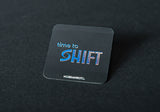
Shift is a physical NFC device — a small puck or a credit-card-sized chip — that lives off your phone. You tap your phone to it to lock the apps you’ve chosen. To unlock, you tap the device again. It can’t be bypassed in software because the off-switch isn’t on your phone.
It’s not motivation. It’s architecture.
Shift Puck — 199 zł, 30-day money-back guarantee. If it doesn’t reduce your daily screen time meaningfully in the first month, full refund.
If you don’t want to spend money on it, that’s fine. Use the 30-day plan above without our product. The plan works either way. The point isn’t the product — the point is that physical separation beats software every time.
Frequently Asked Questions
Most people report a noticeable shift within 7–10 days, with the biggest changes between weeks 3–4. The first week is the hardest because your dopamine system has to recalibrate. Research on neurobiological factors in problematic social media use consistently shows the initial discomfort window is the mechanism working, not a sign that the method is failing.
Build modes. Lock entertainment apps but keep email, Slack, and calendar accessible. Successful users typically have a “work mode” that blocks 5–8 specific apps and a “sleep mode” that blocks more after 9pm.
No, and it shouldn’t. The goal is intentional time. There’s a difference between watching one episode of a show you chose and 47 minutes of TikTok you don’t remember opening. Healthy reduction targets 50–60% of current usage, not elimination.
You haven’t tried physical separation, or you tried a half-measure version of it. Real physical separation — phone in a different building, in a locked box, or behind an NFC blocker — is the highest-adherence intervention in the research. You haven’t applied enough friction.
Settings → Screen Time → App Limits → set limits per category. Then ask someone you trust to set the Screen Time PIN — and refuse to know it yourself. The bypass is too easy if you control the lock.
Settings → Digital Wellbeing → Dashboard → set timers per app. Same warning as iPhone: the bypass is one tap away if you control it. For Android users, NFC-based physical blockers work natively and reliably because Android’s NFC integration is more open than iOS.

Take back two hours of your day starting tomorrow.
Get Shift — 199 zł, 30-day guarantee →More on Brain Fuel: Dopamine Detox: What It Actually Is