Opal is a good app. That's the awkward part of writing this. It's polished, Apple has featured it, and its strictest mode really does lock you out. And yet you're here, looking for an Opal alternative, probably because the app wins some nights and loses others. This guide covers that gap: where Opal is the right tool, where a screen time app runs out of road, and what to try instead.

What Opal gets right
Start with the credit it deserves. Opal blocks apps and websites through Apple's Screen Time API, the same system behind the iPhone's built-in limits. You can run focus sessions, set daily time limits, cap how many times an app opens, and schedule blocks around work hours and sleep.
Then there's the layer on top. A Focus Score, focus reports, rewards, leaderboards for challenges, a Pomodoro timer and widgets. If you like seeing progress as a number, Opal is the most satisfying app in the category. Apple gave it an Editors' Choice badge, and on the US App Store listing it sits at 4.7 stars from about 88,000 ratings.
It also reaches further than most blockers. Opal has an Android app on Google Play, a Mac app for macOS 13 and later, and a Chrome extension. One catch on the Mac: Opal's help pages say sessions and screen time data stay on each device and don't sync between your Mac and your iPhone.
And its strictest mode is a real lock. When you set up a session, Opal asks how hard it should be to quit. The top level, labelled "No way, I'm hardcore", means no breaks and no leaving early, with one emergency pass a week. Opal's site describes its Deep Focus the same way: you can't cancel or bypass the timer you set. Opal also offers App Uninstall Protection, which stops you deleting Opal mid-session.
So if you're looking for an Opal alternative because you think Opal can't be strict, it can. The question is whether strict-on-a-timer is the kind of strict you need.
Where a screen time app runs out of road
Here's where software locks, Opal included, tend to break. Not because they're badly built. Because of where they live.
The lock and the key share a pocket
Every screen time app sits on the same phone it's guarding. Outside a locked session, the rules are usually yours to change. The version of you that set them at 10am isn't there at midnight to defend them.
That's not a character flaw, and it's measurable. Hunt Allcott, Matthew Gentzkow and Lena Song ran a randomized experiment on social media use and published it as Digital Addiction in the American Economic Review in 2022. Letting people set limits on their future screen time substantially reduced use. Their model puts 31 percent of social media use down to self-control problems. People want to be stopped. They just keep overruling whoever set the limit.
Time locks are rigid, so you pick the soft one
Opal's hardest mode locks you out until a clock runs down. That's powerful for a study block. It's awkward for real life, where you might genuinely need Instagram at 3pm to reply to a client. With a timer lock you either burn the weekly emergency pass or stay locked out.
So most days, the tempting choice is the gentler setting. According to Opal's own help page on sessions, the easiest level lets you take short breaks or cancel, and the middle level makes you wait longer before each break. Both are friction, not walls. And the hardcore level is available only on Opal Pro.
The subscription never ends
Opal is free to download, but the full version is a subscription. On the US App Store, checked on 25 September 2026, the yearly plan is $99.99 and the monthly plan is $19.99. That's fine if it works. It's a lot to keep paying for a lock you keep negotiating with.
Opal alternatives compared
Disclosure first: we make Shift, and it's on this list. Prices come from each company's own site or the US App Store, checked on 25 September 2026. They change, so check before you pay.
| Option | How it stops you | What it costs | Works on |
|---|---|---|---|
| Apple Screen Time | Built-in limits, stronger if someone else holds the passcode | Free | iPhone, iPad, Mac |
| one sec | A breathing pause before a chosen app opens | Free for one app, Pro $19.99/yr or $99.99 lifetime | iPhone (iOS 15+), Mac |
| Opal | Sessions, limits, and a hardcore timer lock on Pro | $99.99/yr or $19.99/mo | iPhone (iOS 18+), Android, Mac, Chrome |
| Brick | Tap a physical block to lock, tap again to unlock | $59 once | iPhone (iOS 17+), Android 12+ |
| Shift | Tap a wall-mounted puck to lock, walk back to unlock | 199 zł once, 3 months of Nobrainrot Pro included | iPhone, Android |
Apple Screen Time
It's already on your phone, and it costs nothing. On its own it's easy to wave past. The fix is the same one Opal recommends: have someone you trust set the Screen Time passcode so you don't know it. Opal's help centre calls that the single strongest foolproof move on iOS, and it works with or without Opal.
Best for: anyone with a partner or friend willing to hold the code.
one sec
one sec doesn't block. It makes you take a breath before a chosen app opens, then asks if you still want in. It's the gentlest option here. It's free for a single app, then $6.99 a month, $19.99 a year or $99.99 for life.
Best for: people who open apps on autopilot and mostly need a moment to notice.
Brick
Brick moved the key off the phone. It's a small battery-free block. Tap your phone on it to lock the apps you picked, and tap it again to unlock. If the Brick is at home and you're not, your apps stay locked. It costs $59 once, works on iPhone and Android, and comes with five emergency unbricks and a 30-day guarantee.
Best for: Android users who want a physical lock.
Shift

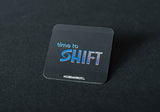
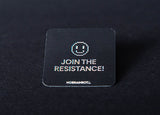
Shift is ours, and it works on the same idea as Brick. Shift is a puck with a magnetic wall mount. Tap your iPhone to it and the apps you chose go dark. Maps, camera, messages and banking stay, because those were never the problem. Getting back in means standing up and walking to wherever the puck lives.
It costs 199 zł once, includes 3 months of Nobrainrot Pro, gives you five emergency unlocks, and has a 30-day money-back guarantee. Works on iPhone and Android. Across Shift users, the app measures an average of 2 hours 13 minutes a day saved.
Best for: iPhone users who want the lock to end when they decide, not when a timer does, as long as deciding costs a walk.
Which Opal alternative fits how you slip
- You like Opal but keep choosing the easy setting: keep Opal and hand the Screen Time passcode to someone else. That's free.
- You open apps without deciding to: one sec. Often the pause is enough.
- You need your laptop covered too: stay with Opal. Its Mac app and Chrome extension are the strongest reason to pay.
- You're on Android and want a physical lock: Brick.
- You want the key off your phone entirely: the Shift puck, mounted somewhere slightly annoying to reach.
Not sure how deep the habit goes? The phone addiction test takes about ninety seconds and will tell you whether a nudge is enough or you need a wall.
How to switch without losing a week
- Write down your number first. Check your daily screen time average in Settings before you change anything. You'll want it in two weeks.
- Cancel the subscription in the right place. Opal says its plans are managed in your iPhone's subscription settings or on its own payments page, depending on where you bought.
- Block three apps, not thirty. The ones you open without deciding to. Block everything and you'll switch the whole thing off by Thursday.
- Put the key somewhere inconvenient. For a physical app blocker like Shift, that means the hallway or the kitchen, not the nightstand.
- Check the number after two weeks. If it barely moved, go one step stricter.
Why we built a lock you have to walk to
We used screen time apps before we built anything. Each one worked for about a week. Then the craving learned where the off switch was, and the off switch was always in the same hand as the phone.
So we moved it. We built Shift as an object, not an app, because an object can live in another room and a setting can't. It won't fix your life. It makes the worst version of you walk to the hallway first, which gives the rest of you a few seconds to catch up.
If you want the wider plan around whatever blocker you choose, read how to reduce screen time without willpower. If you're weighing a dumb phone instead, the dumb phone guide is the place to start.
Frequently Asked Questions
It depends on how you slip. If you open apps on autopilot, one sec's breathing pause is often enough. If you like Opal but keep choosing the easy setting, give your Screen Time passcode to someone you trust. If you want the key off your phone entirely, a physical blocker such as Brick or Shift needs a tap on a device to unlock.
Opal is free to download with in-app purchases. On the US App Store, checked on 25 September 2026, the yearly plan is $99.99 and the monthly plan is $19.99. Prices change, so check the listing before you pay.
In Opal's easier session levels you can take breaks or cancel. Its strictest level, available on Opal Pro, blocks breaks and early exits, with one emergency pass a week. Opal recommends having a trusted person set your Screen Time passcode to make it harder to get around.
Yes. Opal has an Android app on Google Play, a Mac app for macOS 13 and later, and a Chrome extension. Its help pages say sessions and screen time data stay on each device and don't sync between them.
Yes. Brick costs $59 once and works on iPhone and Android. Shift costs 199 zł once, includes 3 months of Nobrainrot Pro, and works on iPhone and Android. one sec also sells a lifetime Pro plan for $99.99.
Opal is software: its strictest mode locks you out until a timer runs down. Shift is a physical puck on your wall. Tap your iPhone to it to lock chosen apps, and walk back to it to unlock. Shift costs 199 zł once and includes five emergency unlocks and a 30-day money-back guarantee.

The key belongs on the wall, not in your hand.
Get Shift: 199 zł, 30-day guarantee →
More on Brain Fuel: How to Reduce Screen Time · How to Stop Doomscrolling

Behalte dein Handy. Sperr den Feed.
WhatsApp, Spotify und Maps bleiben offen. Der Feed nicht.
Gratis InPost · Versand in 48 Std.